Support Search

Quicken Classic Support

How many files can be stored in Quicken Online Backup?

Applies to:
Business
Deluxe
Premier
Starter
Updated: October, 01 2024 11:36PM
👍   people found this helpful
Windows
Mac

Overview

You can store up to 10 backups of each of your files. After 10, saving a new backup will delete the oldest one. You can lock up to nine backups to keep them from being deleted.

To lock and unlock files

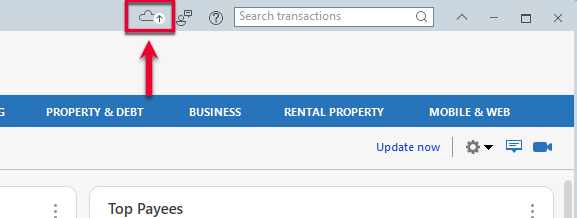
1. Go to File > View/Restore Backups. You can also go to the cloud icon at the top of the window and select View/Restore Backups.
WindowsOLBUButton
Welcome! âś–

Still need help? Contact Us

Or Contact Us:
Product Support
For the best support experience, please sign in with your Quicken ID. We'll find your account and get you to the right team:
For Sales & Renewals, or if you're having trouble signing in:

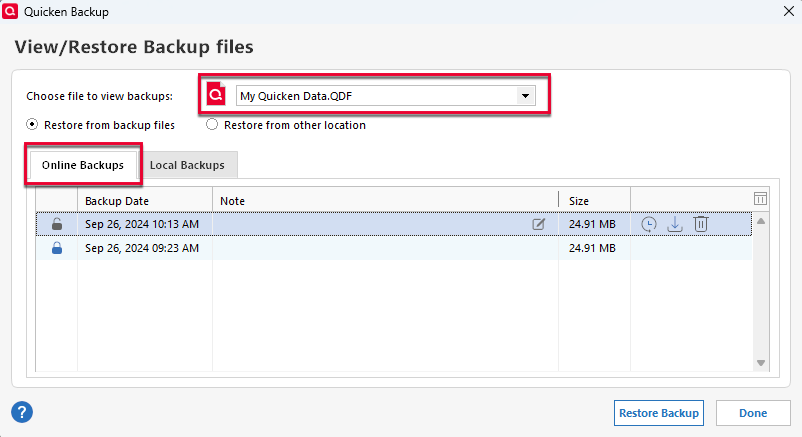
2. Choose the individual Quicken data file (if you have more than one) by name using the Choose a file to view backups menu.
WinOLBUWindow
Welcome! âś–

Still need help? Contact Us

Or Contact Us:
Product Support
For the best support experience, please sign in with your Quicken ID. We'll find your account and get you to the right team:
For Sales & Renewals, or if you're having trouble signing in:

Note: Ensure the Online Backups tab is selected.

3. You can then view the list of backups of the selected data file.

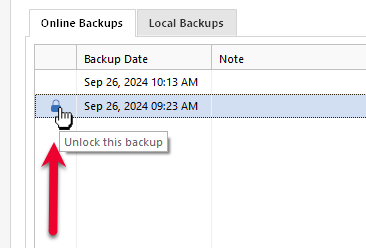
  • To lock a backup, click the lock icon to the left of the backup file.
WinOLBULock
Welcome! âś–

Still need help? Contact Us

Or Contact Us:
Product Support
For the best support experience, please sign in with your Quicken ID. We'll find your account and get you to the right team:
For Sales & Renewals, or if you're having trouble signing in:
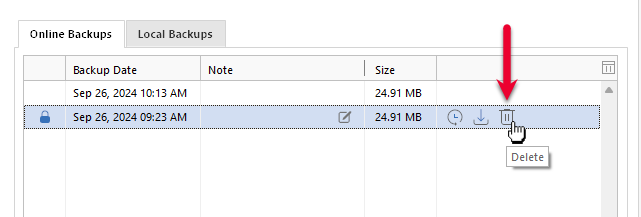
  • To delete an online backup, click the the trash icon to the right of the backup file.
WinOLBUDelete
Welcome! âś–

Still need help? Contact Us

Or Contact Us:
Product Support
For the best support experience, please sign in with your Quicken ID. We'll find your account and get you to the right team:
For Sales & Renewals, or if you're having trouble signing in:
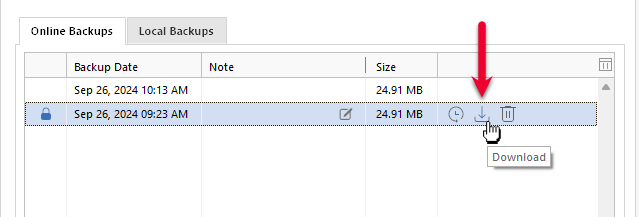
  • If you'd like to download a backup (store a local copy) before deleting it from Online Backup, click the the Download icon to the right of the backup file.
WinOLBUDownload
Welcome! âś–

Still need help? Contact Us

Or Contact Us:
Product Support
For the best support experience, please sign in with your Quicken ID. We'll find your account and get you to the right team:
For Sales & Renewals, or if you're having trouble signing in:

Overview

You can store up to 10 backups of each of your files. After 10, saving a new backup will delete the oldest one. You can lock up to nine backups to keep them from being deleted.

To lock and unlock files

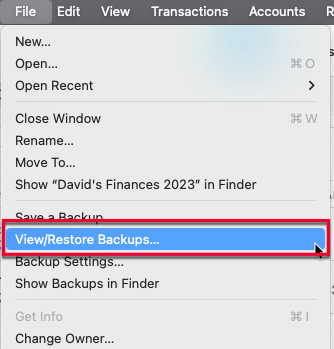
1. Go to File > View/Restore Backups.
MacViewRestore2
Welcome! âś–

Still need help? Contact Us

Or Contact Us:
Product Support
For the best support experience, please sign in with your Quicken ID. We'll find your account and get you to the right team:
For Sales & Renewals, or if you're having trouble signing in:

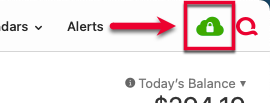
You can also access the View/Restore Backups screen by clicking the Online Backups icon in the upper-right corner.
OnlineBackupsIcon
Welcome! âś–

Still need help? Contact Us

Or Contact Us:
Product Support
For the best support experience, please sign in with your Quicken ID. We'll find your account and get you to the right team:
For Sales & Renewals, or if you're having trouble signing in:

2. Choose the individual Quicken data file (if you have more than one) by name using the Choose a file to view online backups menu.

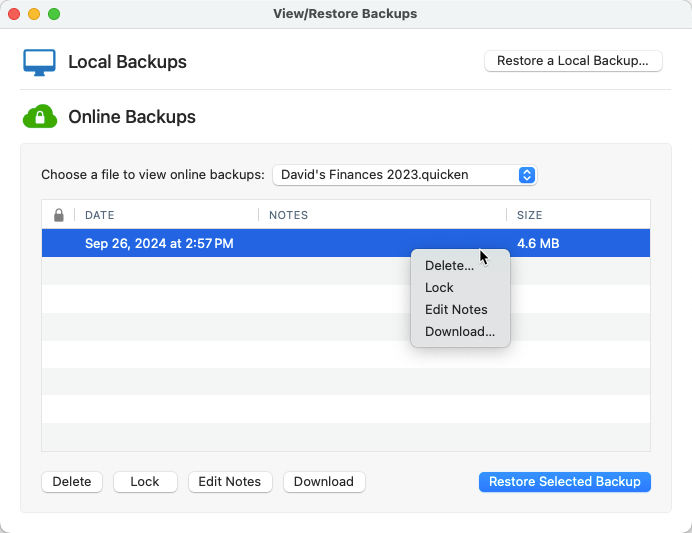
3. You can then view the list of backups of the selected data file.
MacRightClickBackupList
Welcome! âś–

Still need help? Contact Us

Or Contact Us:
Product Support
For the best support experience, please sign in with your Quicken ID. We'll find your account and get you to the right team:
For Sales & Renewals, or if you're having trouble signing in:
  • To lock a backup, right-click or control-click the individual backup file and select Lock Backup.

  • To delete an online backup, right-click or control-click the individual file and select Delete Backup.

  • If you'd like to download a backup (store a local copy) before deleting it from Online Backup, right-click or control-click the individual backup file and select Download Backup.

Article ID: GEN00940

Agent Notes

In This Article

    Welcome! âś–

    Still need help? Contact Us

    Or Contact Us:
    Product Support
    For the best support experience, please sign in with your Quicken ID. We'll find your account and get you to the right team:
    For Sales & Renewals, or if you're having trouble signing in:

    Powered by ChatGPT. Quicken Inc. is not responsible for the content of this answer.