
 Windows
 Mac
MacOverview
You may receive the following message while attempting to use Online Services in Quicken:
"Quicken encountered a server side error while syncing your data. [HTTP-400]"
To resolve this issue
Try signing out of Quicken and signing back in:
Go to Edit > Preferences > Quicken ID & Cloud Accounts.
Click Sign in as a different user.
Type "yes" to confirm and click Sign Out.
After you sign out, sign back in with the same Quicken ID.
Once you are signed back in, attempt your online session again.
If the issue persists
If the problem continues, please contact


Community Content
Overview
You may receive the following message while attempting to use Online Services in Quicken:
"Quicken encountered a server side error while syncing your data. [HTTP-400]"
To resolve this issue
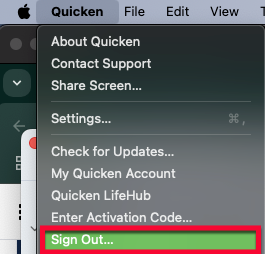
Try signing out of Quicken and signing back in:
1. Go to Quicken > Sign Out....
How can we help?
✖Still need help? Contact Us
2. Click Sign Out.
3. After you sign out, sign back in with the same Quicken ID.