
Overview
To keep Quicken for Mac secure and up-to-date with the latest Mac technologies, and to streamline our efforts to improve your experience, we will be ending support for macOS Monterey (12) after the v8.5 release. This operating system is nearly four years old and no longer receives improvements or security updates from Apple.
Specifically, this means:
Quicken for Mac v8.5 will be the last release that will continue to run on macOS version 12.
If you are running macOS 12, you will no longer be able to upgrade Quicken for Mac beyond v8.5 to get new features, stability fixes, or security improvements.
Your options:
Most people can upgrade to macOS Ventura (13) or newer, even with some older Mac hardware. Check Apple’s
How to Upgrade web page for more details. You can also view the hardware requirements for the last several macOS versions byclicking here . Once you upgrade your computer to macOS 13 or newer, Quicken for Mac will start to update again, and you will be able to get all the latest improvements.If your Mac is not compatible with macOS Ventura (13) or newer, you can upgrade to a newer Mac.
If you choose not to upgrade your operating system, you will be able to continue to use Quicken for Mac v8.5 on macOS 12 for as long as you want. However, connected services may stop working in the future when we discontinue support for v8.5 due to compatibility or security reasons.
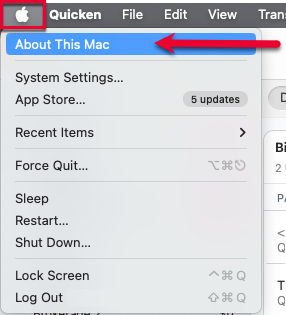
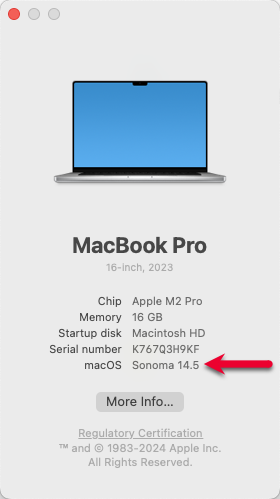
To see what version of macOS you are currently using
1. Click the Apple Menu, then select About This Mac
How can we help?
✖Still need help? Contact Us
2. Look for the line named macOS
How can we help?
✖Still need help? Contact Us
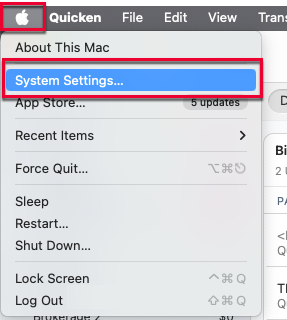
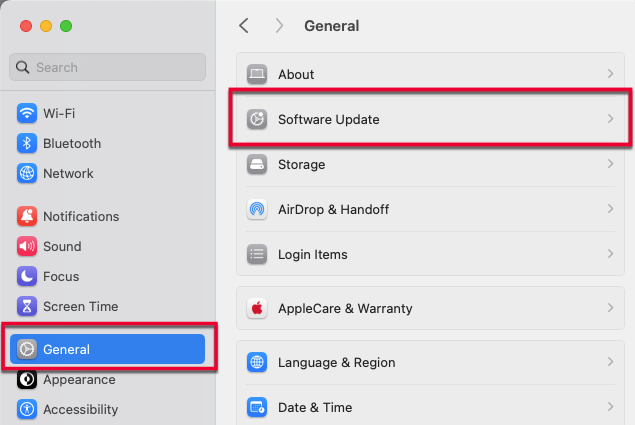
To update your macOS
1. In any application, click the Apple Menu, then System Settings.
How can we help?
✖Still need help? Contact Us
2. Go to the General section, then click the Software Updates icon to check for updates.
How can we help?
✖Still need help? Contact Us
What if I run Quicken on multiple computers?
Customers who run Quicken on multiple computers and share a data file between them may run into issues if one of their machines is running macOS 12 with Quicken v8.5, and the other computer is running a later macOS. If Quicken is updated beyond v8.5 on the machine with the newer macOS, you will not be able to run Quicken with the same data file on both machines because Quicken’s file format changes almost every release so you cannot open the same file with different versions of Quicken. Customers running macOS 12 will not be able to open Quicken versions after v8.5.
Quicken macOS support policy going forward
We are moving Quicken to the same model as Apple in which we only support the latest releases of macOS. As Apple rolls out new major versions of macOS, Quicken will drop support for the older versions. This is also the same policy that many Mac software developers have adopted, including

