
How to Update Quicken
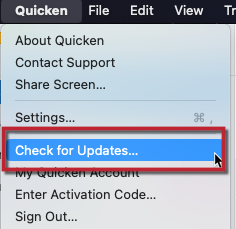
1. Select the Quicken menu > Check for updates
How can we help?
✖Still need help? Contact Us
2. If an update is available for your software, you'll be presented with the ability to download and install the update.
3. If your software is already up-to-date, we'll let you know (and which version you're running).
Latest Release: Version 9.2, 9.2.1, & 9.2.2 (8/2026 & 9/2026)
Investments
NEW - In Account Settings, you can choose whether an eligible money market fund in an investment account is treated as cash or displayed as a security. For example, this can be useful for eligible funds at Fidelity, Schwab, Northern Trust, and other financial institutions
NEW - The Investment Performance report helps you evaluate portfolio performance over time, with flexible subtotaling and a graph of overall performance
NEW - The Tax Loss Harvesting report identifies investment lots with unrealized losses that may present tax-loss harvesting opportunities
IMPROVED - The Update button in Security Detail now refreshes quotes for the security currently being viewed
Budgets
NEW - A Budget widget is now available on the Dashboard, showing current-month spending against budget targets
NEW - Budget categories can now roll unused amounts, overspending, or both into future months
FIXED - Extending a budget multiple years now preserves the expected monthly targets
Dashboard & Registers
IMPROVED - You can now set an account's Display Color from its sidebar context menu
IMPROVED - Account and tag colors are now retained through QXF export and import
IMPROVED - Match Transaction is now always available from the transaction register context menu, with guidance when the selection cannot be matched
Business & Invoicing
IMPROVED - Client imports from QuickBooks Desktop and QuickBooks Online now offer options to merge or overwrite duplicate clients
IMPROVED - You can now email a draft invoice without changing its Draft status
IMPROVED - Emailed invoices now display a Sent status in business views
NEW - Mileage deductions are now calculated for Schedule C, Schedule E, and Schedule F tax reports and included in TXF exports
FIXED - The Business Sales Tax Liability report now shows 0% sales-tax rates under their assigned agencies
IMPROVED - Sales Tax account transaction lists can now be filtered by agency
Connectivity & Imports
IMPROVED - Zillow-connected accounts now direct you to the Zillow-specific reconnection flow when a connection needs attention
Other
ANNOUNCEMENT - The Home > Overview tab has been removed. Its remaining functionality is now available from Dashboard cards, including the new Budget card
9.2.1 Fixes
FIXED - On macOS 27, words entered in Renaming Rules are no longer split into individual characters
FIXED - Budget category names in the 12-Month view are no longer unnecessarily truncated
FIXED - Corrected an issue introduced in 9.2.0 that could cause eBills to incorrectly show $0.00 due
FIXED - Fixed a crash that could occur when updating security prices from Security Detail
FIXED - Addressed an issue that could cause security price updates to fail when a cryptocurrency or commodity security had an incorrect Security Type
9.2.2 Fixes
FIXED - Corrected an issue introduced in 9.2.1 that could cause Quicken to hang in files with large investment portfolios
Previous Releases (2026)
Version 9.1 & 9.1.1 (6/2026 & 7/2026)
Investments
NEW - Added ETF as a distinct security type in Quicken, so ETFs no longer have to be treated as Stock securities
IMPROVED - ETF securities now support an account-level cost basis setting in Account Settings, and ETF sell transactions use that setting when suggesting lots
IMPROVED - Added the ability to include or exclude cash in investment reports
IMPROVED - Portfolio Value & Cost Basis report now displays dashes for periods where no data is available, instead of leaving cells blank
IMPROVED - Security Detail and Watchlist now show dollar and percentage change for the selected graph period
IMPROVED - You can now open Security Detail from Capital Gains Estimator and from securities in the Asset Allocation and Allocation by Security dashboard cards, and open Edit Security from Capital Gains Estimator
FIXED - Collapsed investment report graphs no longer reopen unexpectedly when resizing the report window
FIXED - QXF export/import now preserves ETF, Commodity, and Cryptocurrency security types, including Commodity and Cryptocurrency asset classes
FIXED - QXF export/import now preserves investment holding quantities with greater precision, including cryptocurrency holdings with more than 6 decimal places
Account Registers
NEW - You can now assign a Display Color to an account from Account Settings > Details. Single-account registers use that color for register tabs, row coloring, and selected rows to make the active account easier to identify
IMPROVED - Account Balance Chart controls are clearer: credit-limit line options appear only when applicable, and the Show reminders for... menu is hidden when the selected date range already determines the end date
Bills & Payments
NEW - Scheduled transactions connected to eBills can now automatically update the next instance date to match the eBill due date, independently from existing eBill amount update settings
NEW - Scan for Bills & Income helps you find recurring bills and income in your transaction history and turn them into scheduled transactions. This gives you reminders for upcoming bills and income, and helps projected balances better reflect upcoming activity. It is available from the Bills & Income window and the Bills & Income dashboard empty state
IMPROVED - In Bills & Income, choosing Add Biller Website from the Actions/ellipsis menu for a scheduled bill reminder now opens Biller Details with the website field focused
IMPROVED - Check Pay can now be enabled for supported investing accounts
Business & Invoicing
IMPROVED - You can now customize the columns shown in the Invoices list using the toolbar column picker
IMPROVED - Mileage expenses added to invoices now get a default description based on the trip date and purpose
IMPROVED - Client Details > Overview now includes a Business filter so you can view client details by business
IMPROVED - Closed businesses now appear in more business-related menus, including Business Dashboard, Invoices List, and Mileage List
IMPROVED - Invoice side panel wording is clearer, including the Billable Items tab name and updated tooltip text for the billable items/activity panel toggle
Connectivity & Imports
FIXED - Downloaded transactions are now categorized as expected when Automatically improve the quality of downloaded payee names and categories is enabled, even when Sync is disabled
Renaming & QuickFill Rules
NEW - When renaming a downloaded transaction payee and choosing Also rename existing & future transactions, Quicken now opens the renaming rule flow so you can create or update a rule and choose whether to apply it to existing transactions
9.1.1 Fixes
FIXED - Corrected an issue that could cause invoice line item amounts to calculate incorrectly after changing the quantity in some cases
FIXED - Transaction highlighting now displays correctly when matching transactions by drag and drop in account registers using a custom color
IMPROVED Scan for Bills & Income is better at detecting recurring bills and income, including non-monthly patterns, and now produces cleaner results
Version 9.0, 9.0.1, 9.0.2, & 9.0.3 (4/2026 & 5/2026)
Investments
NEW - Portfolio Value and Portfolio Value & Cost Basis reports now include graphs
NEW - Commodity and Cryptocurrency securities are now supported, including price downloads
IMPROVED - Expanded Asset Class options for securities: Mid-Cap Stocks, Real Estate/REIT, Commodity, and Cryptocurrency
NEW - Portfolio Value and Portfolio Value & Cost Basis reports now include date filters for faster time-range analysis
IMPROVED - Portfolio Value now includes Cost Basis and Gain/Loss columns, with support for column sorting
IMPROVED - Key columns now remain visible while scrolling horizontally in investing views, including Security in Portfolio Value & Cost Basis and Name/Lot in Capital Gains Estimator
Dashboard & Registers
IMPROVED - You can now adjust the text size in the sidebar, similar to the register
IMPROVED - Added keyboard navigation: use left/right arrows to switch focus between register and sidebar, and up/down arrows to move between accounts and sidebar items
IMPROVED - The chart in the Income and Spending tabs is now faster and more visually polished
IMPROVED - Added a Quick Report option to the right-click menu in Payees, Tags, and Categories, and to the Actions menu in Tags and Categories
Bills & Payments
IMPROVED - When choosing Edit and Mark as Paid for a Quick Pay or Check Pay bill reminder in the register, you are now prompted for the next step
IMPROVED - You can now change the final transaction date for scheduled series using End: After [X payments] or End: On date, including one-time schedules
NEW - Business, Client, and Billable fields are now supported in Bill Pay flows including Quick Pay, Check Pay, and Bank Bill Pay
FIXED - You can now change the account for an eBill-connected Bill Reminder
Business & Invoicing
NEW - You can now specify which Stripe payment methods are accepted per invoice (ACH, Credit Card, or both)
NEW - Added a Send Invoice button to the toolbar in Client Details > Invoices
IMPROVED - In the Client Invoices register, you can now right-click a payment to view all invoices it was applied to, including payments applied to multiple invoices
Connectivity & Imports
FIXED - Downloaded payee names now respect the Automatically improve the quality of downloaded payee names and categories setting
FIXED - The External Transfers account balance is now correct when importing selected accounts from Quicken Windows
FIXED - Improved reliability of QuickFill rules that contain transfers, reducing issues that could result in broken transfers
FIXED - QuickFill rules are no longer deleted unexpectedly after syncing
macOS System Requirements
ANNOUNCEMENT - Quicken 9.0 requires macOS 13 or later
9.0.1 Fixes
FIXED - Resolved an issue introduced in 9.0.0 that could cause an error when sending an invoice
9.0.2 Fixes
FIXED - Register display in dark mode on macOS 13 now renders correctly
FIXED - Quicken no longer hangs when saving a scheduled transaction series
FIXED - Resolved an issue introduced in 9.0.0 where the amount-field calculator could produce incorrect results when multiplying by values with three or more decimal places, such as $100 * 0.015 = $1.50
FIXED - Dashboard cards now display correctly after using Restore to default
9.0.3 Fixes
FIXED - Resolved an issue where using Edit and Mark as Paid in Bills & Income could record the payment without advancing the due date in some cases
Version 8.5, 8.5.1, & 8.5.2 (2/2026, 3/2026, & 4/2026)
Investments
NEW - Added Portfolio Value and Portfolio Value & Cost Basis reports
IMPROVED - Added Compound Annual Growth Rate (CAGR) to the portfolio chart inspector. When you select a range on a line chart, the popover now shows CAGR alongside linear growth, and the CAGR curve is graphed within the selected range
IMPROVED - You’ll now be alerted when manually entered or edited investment transactions affect placeholder transactions
NEW - You can now open Security Detail from the Securities list
FIXED - Improved performance calculations (IRR/ROI) for short positions so gains and losses are reflected correctly
Bills & Payments
NEW - You can use a custom date in Bills & Income > Projected Balances
IMPROVED - Scheduled Transactions now support variable amount options (Fixed Amount, Average of Previous Payments, One Year Prior)
IMPROVED - The Bills tab eBill column now shows additional amounts, such as Minimum Due and Balance
NEW - Added an Edit and Mark as Paid option to the Scheduled Transaction status icon in registers
Dashboard & Registers
IMPROVED - Added a Pay Online action to the in-register scheduled transaction editor
IMPROVED - Updated the visual appearance of the register transaction mini-toolbar displayed when editing a scheduled transaction
IMPROVED - The Learning Center now includes new slides covering date field shortcuts and matching downloaded transactions with manual or scheduled transactions
IMPROVED - You can now view details for matched downloaded transactions by clicking the matched status icon
IMPROVED - Updated the transaction status icon for manually matched transactions to display an orange pencil with a blue dot for clearer distinction between manual entry and downloaded match status
Business & Invoicing
IMPROVED - View item prices and descriptions directly in the Products & Services
menu when creating an invoice
NEW - Mileage tracking data is now included in QXF exports for transferring data between Quicken Mac files
Connectivity & Imports
NEW - Added a sample CSV to the Import Security Prices from a CSV File window as a reference template
FIXED - Resolved an issue that could cause an account sync error to appear on every sync
Other
NEW - Added a Quicken LifeHub toolbar icon for quick access, including the option to View LifeHub and Send File Summary (subscription required)
Future macOS System Requirements
ANNOUNCEMENT - Quicken Mac version 8.5 is the final version that supports macOS 12
8.5.1 Fixes
FIXED - Fixed an issue introduced in 8.5 that could cause a 2–3 second delay when editing a scheduled transaction series
FIXED - Fixed an issue where the Due Date column in Bills & Income did not advance when marking a scheduled transaction as paid or deposited
FIXED - Fixed an issue where eBills could not be linked to scheduled transactions
8.5.2 Fixes
FIXED - Fixed the reporting of invoice income in Schedule E and Schedule F tax reports
FIXED - Fixed an issue where macOS would sometimes append “.00” to amount fields when switching to another app while editing the field
Version 8.4, 8.4.1, & 8.4.2 (12/2025 & 1/2026)
Business & Invoicing
NEW - You can now email invoices directly from Quicken and accept payments through Stripe
NEW - Predefined Payment Terms are now available when creating invoices
NEW - You can now assign Business, Client, and Billable fields to scheduled transactions
IMPROVED - You can now edit Invoices and Clients using keyboard shortcuts
IMPROVED - You can now delete transactions from Client Details > Transactions
IMPROVED - Billable transactions that haven’t been invoiced are now labeled as Not Billed in Client Details
IMPROVED - The Create Credit from Invoice option is now available from the Invoices list action menu
IMPROVED - Clearer messaging is shown when accounts such as Client Invoices and Sales Tax are automatically created to support invoicing
Home Dashboard
NEW - You can now duplicate and delete dashboard cards
NEW - Added the ability to restore all dashboard cards and settings to their default state
IMPROVED - Added a Clear All option to the Categories menu when customizing the Spending by Category card
IMPROVED - The Spending by Category card now supports drilling down into categories to view subcategory spending, and reports generated from Other are now grouped by category
FIXED - Fixed an issue that could cause incorrect reporting in the Spending by Category card when categorized transfer transactions were present
eBills & Bill Pay
NEW - You can now add a new Quick Pay payee directly from Bill Pay > Pay with Quick Pay
IMPROVED - A default category is now selected when adding a new eBill
IMPROVED - Improved biller search when adding a new Quick Pay payee
IMPROVED - The Amount field is now cleared when switching payees in the Make a Quick Pay Payment window
Accounts & Registers
IMPROVED - You can now navigate directly to a transaction from the graph popover in Account > Balance
IMPROVED - Performance when opening the Reconcile History window
Securities
IMPROVED - You can now hide securities from the Securities list
IMPROVED - Added a Currently Held filter to the Securities list
Bug Fixes and Other Improvements
FIXED - Fixed an issue where selected register values were not always fully highlighted
FIXED - Addressed several issues that could result in broken transfers when downloading transactions
FIXED - Fixed an issue that prevented transaction matching and the application of Renaming and QuickFill rules in Quicken Connect investment accounts
IMPROVED - Improvements to report data storage to help reduce Quicken data file size
IMPROVED - Improvements to CSV transaction import
8.4.1 Fixes
FIXED - Fixed a sync issue that could occur in Quicken Business & Personal when working with files that have more than 200 clients
FIXED - Fixed a few crashes that affected a small number of customers
8.4.2 Fixes
FIXED - Fixed several minor stability and quality issues
Previous Releases (2025 and older)
For older release notes,

