
 Windows
 Mac
MacOverview
Need to view your Quicken data in different locations? You can now sync transactions from your Quicken desktop product to Quicken on the Web.
What is Quicken on the Web?
Quicken on the Web is the web-based companion that allows you to view your transactions and access some of Quicken's key features from any computer via the web! For more information on the features available in Quicken on the Web,
How to sync to Quicken on the Web (Companion App)
First, set up Quicken Sync in Quicken Desktop:
1. Open Quicken and go to the Mobile & Web tab. Depending on the sizing of the Quicken window, the Mobile & Alerts tab may be located in the More tab. Note: If the Mobile & Web tab is not present, choose the Mobile & Web menu, and then click Go to Mobile & Web.

How can we help?
✖Still need help? Contact Us
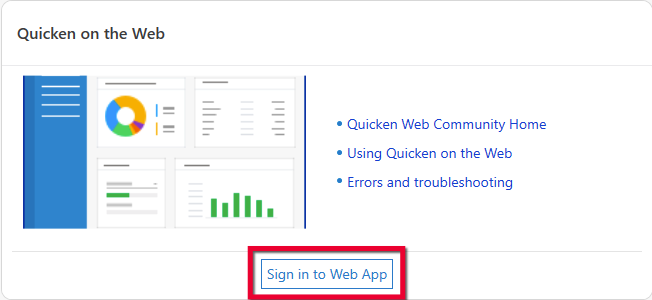
2. Click the Sign in to Web App button. Note: If the options are grayed out, ensure the Quicken Mobile & Web Sync toggle is set to ON.
How can we help?
✖Still need help? Contact Us
3. Quicken will open a webpage on your default browser. Sign in using your Quicken ID.
To sync your Quicken data to Quicken on the Web:
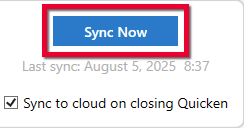
1. Click Sync Now under the Mobile & Web tab.
How can we help?
✖Still need help? Contact Us
2. Go to
3. Quicken on the Web will will automatically sync your transactions; you can see the spinning arrow in the upper right when Quicken on the Web is performing a sync, or you can initiate a sync at any time by clicking the arrow.

How can we help?
✖Still need help? Contact Us
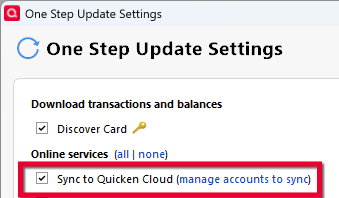
Note: To sync to Quicken on the Web whenever you perform a One Step Update, just select Sync to Quicken Cloud under your One Step Update settings (Tools > One Step Update...):
How can we help?
✖Still need help? Contact Us
How do I access Quicken on the Web?
You can access Quicken on the Web directly through
Where is my data stored?
Your Quicken data is still stored on your computer. The Quicken Cloud enables your desktop data to sync between Quicken on the Web, Quicken Mobile, and Quicken Desktop. Read more information about the Quicken Cloud
Can I export my transactions from Quicken on the Web?
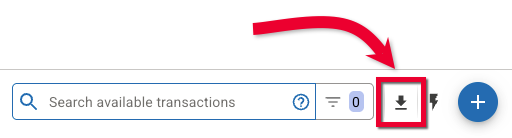
Quicken on the Web now allows you to download register transactions to a CSV file. Just select an account and click the download button in the upper-right corner of the register.
How can we help?
✖Still need help? Contact Us
Why are some of my accounts missing on Quicken on the Web?
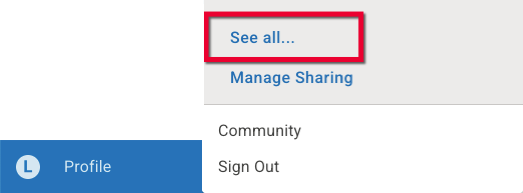
If you find that some of your accounts don't appear on Quicken on the Web, be sure to check that these accounts have been selected to sync in your desktop product. Also, be sure that the correct data file has been selected to display in Quicken on the Web. You can do this by clicking the letter icon in the bottom left corner of the Quicken on the Web screen. Click See All..., then select the correct data file from the list.
How can we help?
✖Still need help? Contact Us
Why are some reports incorrect on Quicken on the Web?
If you find that some of your reports appear incorrectly on Quicken on the Web, be sure to check that these accounts have been selected to sync in your desktop product.
Can Quicken on the Web be used as a file backup?
The Quicken Cloud is a cloud service that transmits your information between Quicken on the Web and the Quicken desktop products. However, it is not a cloud drive and cannot be used as an online backup.


Community Content
Overview
Need to view your Quicken data in different locations? You can now sync transactions from your Quicken desktop product to Quicken on the Web.
What is Quicken on the Web?
Quicken on the Web is the web-based companion that allows you to view your transactions and access some of Quicken's key features from any computer via the web! For more information on the features available in Quicken on the Web,
How to sync to Quicken on the Web (Companion App)
First, set up Quicken Sync in Quicken Desktop:
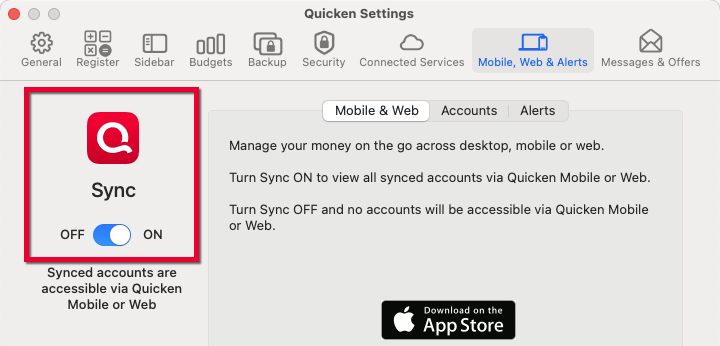
1. Go to Quicken > Settings... > Mobile, Web & Alerts.
2. Sign in with your Quicken ID, if prompted.
3. Use the Sync toggle switch to turn on Web Access.
How can we help?
✖Still need help? Contact Us
To sync your Quicken data to Quicken on the Web:
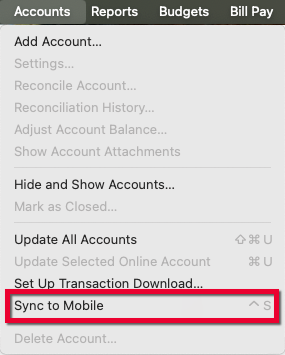
1. Go to the Accounts menu > Sync to Mobile.
How can we help?
✖Still need help? Contact Us
OR
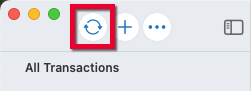
2. Click the circular arrow above your account list to Update Online Accounts.
How can we help?
✖Still need help? Contact Us
3. Go to
4. Quicken on the Web will automatically sync your transactions; you can see the spinning arrow in the upper right when Quicken on the Web is performing a sync, or you can initiate a sync at any time by clicking the arrow
How can we help?
✖Still need help? Contact Us
How do I access Quicken on the Web?
You can access Quicken on the Web directly through
Where is my data stored?
Your Quicken data is still stored on your computer. The Quicken Cloud enables your desktop data to sync between Quicken on the Web, Quicken Mobile, and Quicken Desktop. Read more information about the Quicken Cloud
Can I export my transactions from Quicken on the Web?
Quicken on the Web now allows you to download register transactions to a CSV file. Just select an account and click the download button in the upper-right corner of the register.
How can we help?
✖Still need help? Contact Us
Why are some of my accounts missing on Quicken on the Web?
If you find that some of your accounts don't appear on Quicken on the Web, be sure to check that these accounts have been selected to sync in your desktop product. Also, be sure that the correct data file has been selected to display in Quicken on the Web. You can do this by clicking the letter icon in the bottom left corner of the Quicken on the Web screen. Click See All..., then select the correct data file from the list.
How can we help?
✖Still need help? Contact Us
Why are some reports incorrect on Quicken on the Web?
If you find that some of your reports appear incorrectly on Quicken on the Web, be sure to check that these accounts have been selected to sync in your desktop product.
Can Quicken on the Web be used as a file backup?
The Quicken Cloud is a cloud service that transmits your information between Quicken on the Web and the Quicken desktop products. However, it is not a cloud drive and cannot be used as an online backup.